References:
Why Sieve Filters?
Rather than a long list of email filter rules that become unmanageable, Proton encourages the use of sieve filters - and limits users to 250 filters total. Sieve allows a user to combine what might by over a dozen filter rules down into one logical, legible, flexible flow.
This little blog post is specific to Proton and how they do email filters with Sieve. This post is not all encompassing, RTFM.
Lessons Learned (so far)
- Sieve filters will need tweaking and testing to get right, I’d recommend setting up a git repository so filters can be updated in a code editor vice directly in the Proton Mail settings.
- Proton treats personal tags and folders the same from a filtering perspective.
- Separate filters into categories, it’ll make management easier when you want to make updates / changes.
- Be willing to update filters - once you get the hang of how they work, updates are easy, and usually just a line or two in the relevant filter.
- If you’re confused on how to do something, make the filter via the GUI, save it, then click the drop down to edit the new filter in sieve. This will show you how Proton wants their filters constructed.
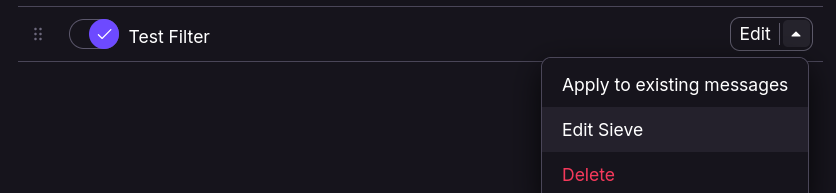
- Filter terms are case agnostic:
delivermatches withDeLivErY. - 20FEB26:
addflagneeds to come beforefileinto.
Filters
Require
Think of this as an #include or import statement:
require ["include", "environment", "variables", "relational",
"comparator-i;ascii-numeric", "spamtest", "fileinto", "imap4flags"];
Spam Blocking
Proton includes a spam blocker to prevent your filter from being run against spam messages at the top of each rule.
# Generated: Do not run this script on spam messages
if allof (environment :matches "vnd.proton.spam-threshold" "*",
spamtest :value "ge" :comparator "i;ascii-numeric" "${1}")
{
    return;
}
My Filters (examples)
I store each of the rules below in their own filter for easy editing/troubleshooting later.
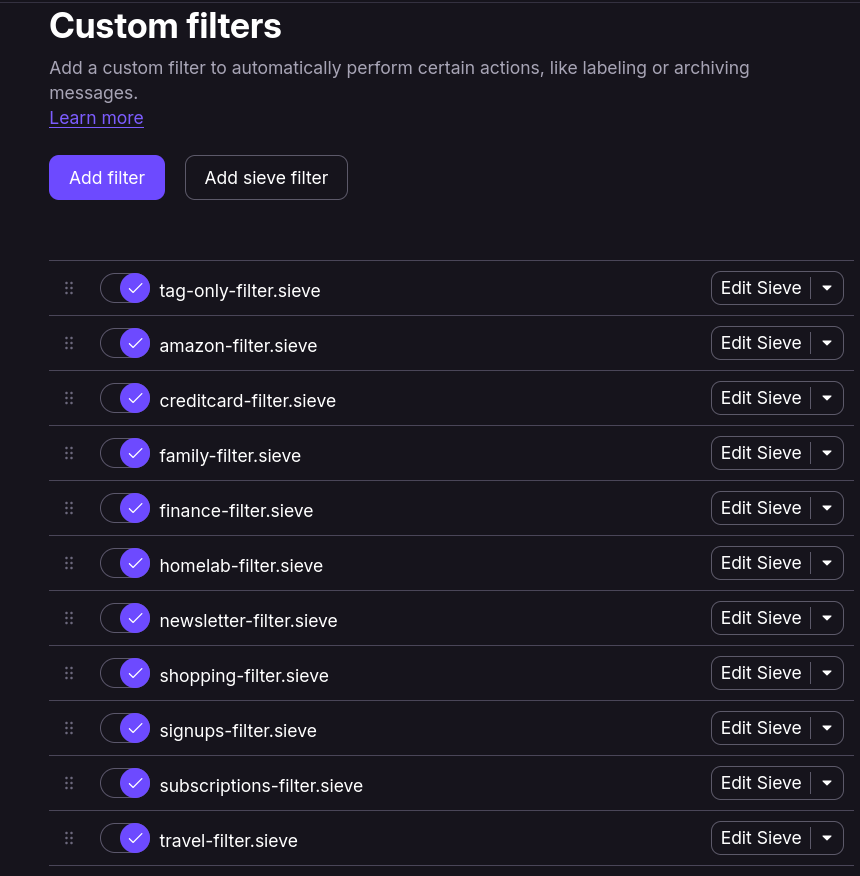 Note: Not all filters are included below for privacy reasons (I’m using Proton Mail, you don’t get to see everything)!
Tag Only Filter
Use: Tags all emails coming from a Proton Alias, Google, and Ebay
# Alias
if anyof (
	allof (address :all :comparator "i;unicode-casemap" :matches "To"
	*passmail.net", "*passinbox.com", "*passmail.com", "*passfwd.com"]),
    allof (address :all :comparator "i;unicode-casemap" :is "To"
    "stuff@customdomain.com", "something@customdomain.com"])){

    fileinto "Alias";
}

# ebay
elsif allof (address :all :comparator "i;unicode-casemap" :matches "From" "*ebay.com") {
    fileinto "ebay";
}

# Google
elsif allof (address  :all :comparator "i;unicode-casemap" :matches "From" "*google.com") {
    fileinto "Google";
}
Amazon
Use: Orders go into my purchases folder, account info into my subscriptions folder, and regular ads into a shopping folder AND marks them as read.
# Amazon
if allof (address :all :comparator "i;unicode-casemap" :matches "From" "*amazon.com") {
	fileinto "Amazon";

    # Purchases
    if allof (
    header :contains "subject" "order",
    header :contains "subject" ["confirmation", "confirmed", "deliver"]){
    fileinto "Shopping/Purchases";
    stop;}

    # Subscriptions
    elsif allof (address :all :comparator "i;unicode-casemap" :is "From" "account-update@amazon.com"){
        fileinto "Family/Subscriptions";
        stop;
    }

    # Shopping
    else {
        addflag "\\Seen";
        fileinto "Shopping";
        stop;
    }
}
Credit Cards
Use: Emails from credit card providers go directly into my credit card folder.
# Credit Cards
if allof (address :all :comparator "i;unicode-casemap" :matches "From"
["*americanexpress.com", "*chase.com", "*citi.com", "*capitalone.com"]) {
    fileinto "Finance/Credit Cards";
    stop;
}
Homelab
Use: Emails from Cloudflare get tagged as Cloudflare and filed into my Homelab folder.
Note: This is an example of how Proton treats folders and tags equally.
# Cloudflare
elsif allof (address :all :comparator "i;unicode-casemap" :matches "From" "*cloudflare.com") {
    fileinto "Cloudflare";
    fileinto "Homelab";
    stop;
}
Sign-Ups
Use: Moves any email from a random sign-up service directly into a folder and then marks as read.
# Signups
elsif allof (address :all :comparator "i;unicode-casemap" :matches "From"
["*rover.com", "*nextdoor.com", "*facebook.com", "*.twitch.tv", "*linkedin.com"]) {
    addflag "\\Seen";
    fileinto "Shopping/Signups";
    stop;
}
Subscriptions
Use: Moves all the emails from subscription services into the subscriptions folder.
# Subscriptions

if allof (address :all :comparator "i;unicode-casemap" :matches "From"
["no-reply@costco.com", "noreply@google.com", "netflix.com", "hulu.com", "*calendar.proton.me", "*notify.proton.me", "*uber.com", "*paramountplus.com", "*hbomax.com", "*disneyplus.com"]){

    # Proton
    if allof (address :all :comparator "i;unicode-casemap" :matches "From"
    ["*calendar.proton.me", "*notify.proton.me"]) {
        fileinto "Proton";
    }

    # Streaming
    elsif allof (address :all :comparator "i;unicode-casemap" :matches "From"
    ["*paramountplus.com", "*hbomax.com", "*hulu.com", "*netflix.com",
    "disneyplus.com"]) {
        addflag "\\Seen";
        fileinto "Streaming";
    }

    # Uber
    elsif allof (address :all :comparator "i;unicode-casemap" :matches "From"
    "*uber.com") {
        addflag "\\Seen";
        fileinto "Uber";
    }

    fileinto "Family/Subscriptions";
    stop;
}
Travel
Use: find and moves the emails from travel related services.
# Travel
elsif allof (address :all :comparator "i;unicode-casemap" :matches "From"
["*delta.com", "*amtrak.com", "*@hilton.com", "*ihg.com", "*marriott.com"]) {
    fileinto "Travel";
    stop;
}
Conclusion
Sieve filters can get far more complex, such as sending auto replies depending on the sender address, the time an email was sent, the email size etc. This is just an overview of how some of mine are set up (and mine still need a little work).